Best Practices for Tracking and Recording Accounting Transactions

What Business Transactions Actually Tell You

Every time money moves in or out of your business, it creates a transaction. Sales, expenses, purchases, and loans all shape your financial position.

On their own, these transactions are just entries. Together, they tell a story. They show how your business earns money, where it spends it, and how quickly cash moves through your system.

When transactions are not tracked properly, it becomes difficult to answer simple questions. Are you profitable? Are expenses growing faster than revenue?

According to the U.S. Small Business Administration, maintaining accurate financial records is one of the most important habits for long-term business stability. Without it, owners often make decisions based on incomplete or outdated information.

With FINSYNC, transactions are captured and categorized as they happen. Instead of manually recording activity, you can see your financial position in real time, which makes it easier to spot patterns early and adjust before small issues turn into bigger problems.

How to Stay Organized Without Adding More Work

Most businesses organize transactions into three categories: income, cost of goods sold, and expenses. The structure itself is simple. The difficulty is maintaining it over time.

Manual systems often break down because they rely on consistency. Miss a few entries or categorize something incorrectly, and your financial picture starts to lose accuracy.

This is where automation changes the process. FINSYNC connects directly to your bank accounts and payment activity, automatically organizing transactions. If your payment setup still feels disconnected, choosing the right payment platform can make a big difference in how everything flows together.

Bank reconciliation becomes easier as well. If you want a deeper explanation of how this works, this breakdown of bank reconciliation and why it matters is a useful reference. Instead of comparing records line by line, your transactions are matched against your bank activity as they occur, reducing errors and keeping your records aligned with your actual cash position.

Turning Transactions Into Better Decisions

Tracking transactions is only valuable if it leads to better decisions.

When your financial data is connected, you can see more than totals. You begin to understand timing, behavior, and trends. You can identify which customers pay quickly, where delays happen, and how cash flow shifts over time.

This level of visibility is difficult to achieve with disconnected tools. It requires your payments, accounting, and cash flow to work together.

That is the role FINSYNC plays. You can send invoices, accept payments, track expenses, and generate reports from the same system. Instead of spending time gathering information, you can focus on using it.

For a broader view of how this connects to funding readiness and financial visibility, the Federal Reserve has noted that many business owners struggle to access capital due to incomplete financial records or unclear cash flow. Clear, organized data changes that.

The Bottom Line

Good financial tracking is not about doing more work. It is about having a system that keeps everything accurate and connected.

FINSYNC helps you move from simply recording transactions to actually understanding them. When your financial data is clear and up to date, you are in a better position to manage cash flow, make decisions, and grow with confidence. Get started with FINSYNC today and simplify your financial management to take control of your business.

How to Choose a Payment Platform for Your Business

What To Look For In A Payment Platform

Real-Time Connection To Your Financial System

Money movement should not be an island.

Seek a platform that connects directly to your bank accounts, monitors money coming in and going out, and automatically updates your records. When payments, accounting, and cash flow are connected, you reduce manual work and avoid gaps in your numbers, making it easier to understand your business cash flow in real time.

This is where clarity begins. You are not simply recording transactions. You are seeing your financial situation in real-time.

Pricing That Matches How You Operate

Payment platforms vary widely in how they charge, and understanding credit card processing fees can help you evaluate the true cost over time.

Some take a percentage of every transaction. Others layer in monthly fees. Some offer a free entry point and scale pricing as your business grows.

The goal is not to find the cheapest option. It is to understand how fees impact your margins over time and how they affect your ability to improve your cash flow management as your volume grows.

A cheap solution today might not be cheap tomorrow when the volume goes up.

Think about the size of your typical transaction, the frequency of transactions, and the types of payment. Then pick one that works with how you get paid.

Support When It Matters

When payments are delayed or something breaks, it affects more than one transaction. It impacts your cash flow.

Strong support is not a nice-to-have. It is part of the product.

You want access to real people who can help resolve issues quickly and clearly. Not just documentation or automated responses. This becomes even more important as your business grows or starts handling larger transactions.

Flexibility As Your Business Evolves

Your payment needs will change.

You may start with simple invoices and card payments. Over time, you might add subscriptions, recurring billing, or larger contracts. You may expand into new markets or work with different types of customers.

Choose a platform that can grow with you without forcing you to switch systems later. The more connected your operations become, the more costly it is to rebuild them.

How To Get More Value From Your Platform

However, selecting the platform is only the beginning.

The real power lies in the effective use of the platform.

To begin, review your dashboard regularly. Don’t just focus on the total revenue. Consider the timing, the length of time before payment, and which customers pay quickly, and which customers don’t.

Keep your system updated. New features often improve how payments connect to reporting, automation, and security, especially when you automate your billing and payments. These updates can eliminate unnecessary hurdles in the workflow.

How FINSYNC Fits In

A payment platform should do more than move money. It should help you understand it.

When payments are connected to your financial data, you gain visibility. When you have visibility, you make better decisions. That is what allows a business to grow with confidence rather than react to surprises.

FINSYNC brings payments into a connected financial system.

You can send invoices, accept payments, manage cash flow, and keep your books updated in one place. Everything ties back to a single profile, so you don’t have to piece together disconnected tools.

That visibility helps you understand where your business stands today and what comes next.


What Are ACH Payments? Direct Deposit Vs Direct Payments

Paying vendors and receiving payments from customers are essential functions of running a business. Yet, many entrepreneurs overlook the simple and cost-effective systems available to streamline these transactions. Among the most widely used methods is ACH, short for Automated Clearing House, a nationwide network for moving funds electronically between bank accounts.

Whether you are just getting started or seeking ways to improve your payment operations, understanding how ACH payments work is a valuable step toward managing cash flow more efficiently.


What Are ACH Payments?

ACH payments are electronic transfers processed through the Automated Clearing House network, a secure system operated by Nacha and supervised by the Federal Reserve. This network enables financial institutions across the country to move funds between accounts for payroll, billing, vendor payments, tax refunds, and more.

Instead of sending checks or wiring money, businesses can use ACH to send and receive payments directly through the banking system. Funds are transferred in batches and typically posted within one or two business days, depending on the financial institutions involved.


Shot of a young woman using a digital tablet while working on a farm


Direct Deposit vs. Direct Payment

ACH payments fall into two categories: direct deposits and direct payments. Both use the same network, but the direction of the transaction differs.

Direct deposit refers to payments made into an account. For example, when an employer processes payroll, employees receive their wages directly into a checking or savings account. This method is also used for government benefits, tax refunds, and retirement disbursements.

Direct payment refers to funds withdrawn from a bank account to pay for goods or services. This is commonly used for recurring bill payments such as utilities or rent, as well as one-time purchases or peer-to-peer transfers. In this case, the payer authorizes a business or individual to pull funds from their account.

These transactions can be categorized as either credit or debit transfers:

• A credit transfer is initiated by the payer to move money into another account. Examples include paying employees, vendors, or contractors.

• A debit transfer is initiated by the recipient with the payer’s authorization. This is useful for collecting recurring payments or converting checks into electronic transfers using services such as a digital lockbox.

Both types of ACH transactions help reduce manual effort and paper handling and are less expensive than other payment types, such as wire transfers


Processing Time

ACH remains one of the most cost-effective ways to send or receive money. Many banks and platforms charge little or nothing for basic ACH transactions. Sending money externally may cost a few dollars, while receiving ACH payments is very inexpensive.

With FINSYNC, ACH transactions have a flat fee of 50 cents. Whether you are sending funds for a bill or receiving payments for an invoice, this predictable pricing allows small businesses to manage payments with clarity and control.

Person-to-person payments initiated through banking apps or third-party platforms may involve fees depending on the provider. However, in general, ACH is among the most affordable options available.


Shot of a young woman using a digital tablet while working on a farm


Why ACH Matters for Small Businesses

ACH payments support healthier cash flow by providing reliable, scheduled transfers. They help eliminate the delays and uncertainty of paper checks, reduce the need for physical handling, and allow for better control over timing.

In combination with FINSYNC’s financial tools, businesses can automate billing and collections, streamline payroll, and receive payments faster. Features like CollectEarly™ make it possible to access funds as soon as an invoice is accepted. And with real-time insights from Fynn, your AI assistant, business owners can receive recommendations on how to optimize payments and operations.


A Smarter Way to Manage Payments

ACH is a foundational tool for simplifying operations and improving financial performance. When connected to a broader system for invoicing, payroll, accounting, and cash flow management, ACH becomes part of a more strategic way to run your business.

FINSYNC’s all-in-one Business Platform brings these elements together in a single, integrated solution that saves time, reduces errors, and helps you focus on growth. Whether you are sending a payment or receiving one, ACH is just the beginning.


Fynn Moves Your Business Forward Faster 
Meet Fynn, your AI assistant, built to simplify business planning, funding, operations, and growth. With a fully connected Business Platform and Financial Network, Fynn helps you turn ideas into action, secure funding, streamline operations, and accelerate success.
From business planning to seamless execution and smarter financial connections, Fynn keeps everything and everyone in sync—so you can focus on what truly matters, in business and in life. 

Simplify Your Billing Through Invoice Automation

It seems like machine learning and Artificial Intelligence are making headlines every day. Have you ever wished your accounting could be just as advanced? The latest accounting platforms are designed to take the stress out of billing and payments, making your financial tasks care for themselves.


Imagine a scenario where your invoices are sent automatically without you lifting a finger. Welcome to the world of invoice automation, where your business’s finances become as easy to manage as sending an email. This simple yet powerful tool can change how you do business. 


Understanding Invoice Automation


Let’s start at the beginning. What is invoice automation? Sometimes called automated invoices, think of it as an intelligent system that takes over the old-school way of doing invoices manually. Instead of spending time creating invoices, tracking them, and following up, this technology does it all for you with software. It is the accounting equivalent of moving from mailing letters to sending emails. Invoice automation makes your life easier and helps your business run smoother.


Current Trends in Automation


Here are some of the latest accounting trends in automation that small businesses are quickly adopting. 


• Cloud-Based Accounting: The significant shift is toward cloud-based solutions. This means you can handle your accounting from any device, whether at a coffee shop or beach. Flexibility and accessibility are important for an entrepreneur who’s always on the move.

• Mobile Accounting Apps: Along with cloud-based solutions, mobile apps are very popular. These apps let you quickly check your finances, send an invoice, or even capture receipts for expenses right from your phone. 

• Integration with Other Systems: Another trend is how well these accounting tools play with other software and banking systems. It is even better if they automatically sync with your bank accounts while having payments, payroll, and cash flow management all on one platform. 

• Real-Time Data and Reporting: Businesses are now getting real-time financial insights. You can see how your business is doing at any moment, not just at the end of the month. This helps in making quick, informed decisions.

• Enhanced Security and Compliance: This technology comes with enhanced security features to protect your financial data. Look for features like 2-factor authentication, audit trails, and regular updates to comply with the latest tax laws and financial regulations.

• User-Friendly Interfaces: Finally, these tools are becoming more user-friendly. They are designed for business owners, not just accountants, so you do not need a finance degree to understand your own business finances.


These trends make financial management more manageable, accessible, and insightful for small business owners. 


Features of Invoice Automation Tools


Here are some examples of how the features of invoice automation can help you with your day-to-day business operations. 


Recurring Invoices

First, instead of creating a new invoice every month for the same service, you can set up a recurring invoice. Once you set the details like the amount, the client’s info, and the billing cycle, the tool does the rest. It sends out the invoice automatically on the specified date. This means no more forgetting to bill your clients and no repetitive paperwork.


Automatic Payment Reminders

Secondly, automatic payment reminders mean you do not have to keep track of who owes you and how much; the software does it for you. Suppose a client forgets to pay their invoice. Instead of you having to remember to follow up, the software sends them a gentle reminder. It is like having a personal assistant who keeps track of all your receivables, ensuring you get paid on time.


Late Payment Reminders and Fees

Finally, late payments are a reality in business but should not affect your cash flow. With invoice automation tools, you can set up a system to automatically add a late fee to overdue invoices. For example, if a payment is two weeks late, the system can add a pre-decided percentage or a fixed fee to the invoice. This encourages timely payments and compensates you for the delay. Everything is transparent and automatic, so there is no awkward conversation with your client.


Preparing for the Future with Automation


As we look to the future, invoice automation is poised for significant advancements that will further streamline financial management. Here’s a glimpse into what’s on the horizon:


1. More Machine Learning: Expect intelligent systems that learn from your habits, offering tailored suggestions and preventing accounting errors.


2. Voice-Activated Invoicing: Imagine issuing invoices through voice commands, increasing accessibility and convenience.


3. Predictive Analytics: Predict your cash flow by analyzing past trends, aiding in more informed financial decisions.


4. IoT Integration: As IoT (Internet of Things) devices become more common, they might automate billing based on usage, streamlining the process for utility and service-based businesses.


5. Customizable Automation: Look for more personalized automation options that align with your industry or even the specific needs and practices of your individual business.


With these innovations on the horizon, now is the ideal time to get comfortable with existing automation technologies. By adapting early, you will be well-equipped to integrate these future advancements, keeping your business efficient and competitive.


Conclusion


For entrepreneurs and small business owners, getting familiar with technologies like invoice automation is becoming increasingly important. While it is not a one-size-fits-all solution, tools like FINSYNC can be a great starting point to help simplify your invoicing process. They offer a potential path toward more efficient business operations. At the core of successful businesses frequently lies an efficient financial management system. Exploring invoice automation could be a step in building that for your business.


Start exploring the world of invoice automation, streamline your invoicing process, and begin your journey towards a more financially efficient way of running your business.


How FINSYNC Can Help


There are 3 primary ways FINSYNC helps business owners. (1) CO.STARTERS courses through FINSYNC can help turn your business idea or side hustle into a thriving business. (2) On our website, you can also apply for a business bank account. (3) In addition, the FINSYNC software allows you to run your business on One Platform – invoice customers, pay bills, process payroll, automate accounting, and manage cash flow. To learn more about how we can help your business start, scale, and succeed, contact us today.

 

How to Create an Invoice and Reduce Processing Time for Your Business

If you’re a small business owner, you understand the importance of keeping an eye on your company’s finances. After all, knowing where every penny goes is critical for making informed decisions about future investments and strategies. One way to fulfill this goal is to invoice your customers correctly every time so they understand the services provided and secure prompt payment for your business. 


An invoice is a statement that money is owed from the business providing the goods or services to their client. This document states what was delivered, how much it costs for each item/service (including applicable taxes), and when the payment is due. You can learn more about what an invoice is with this previous article. 


Creating an effective, systematized invoicing process helps manage client relationships while confirming that customers pay on time.


Fortunately, several methods can help you streamline the invoicing process to ensure that your business stays on a solid financial footing with a little effort. This article covers the invoice lifecycle, key elements within an invoice, leaning into automation, and the value of financial platform integration. 


Lifecycle of an Invoice


The first step in creating an invoice is gathering all the necessary information. Match the customer’s name and contact information with the description of the products or services provided. Once you have all of this information, you can begin entering it into an invoice template. Various templates are available as part of accounting software, or you can create your own. Once you have entered all the necessary information, it is transmitted to the customer for approval.


The customer will review the invoice and ensure that everything is correct. If any changes are required, this invoice will return to the draft stage. 


After the customer has approved the invoice, it goes to the accounting department for processing. In this department, the invoice is reviewed for accuracy and completeness. The invoice is entered into the client’s accounting system upon receipt and acceptance, and payments are processed.


The final stage in the invoicing process is when the business that sent the invoice receives payment in full from the customer. In some cases, businesses may offer payment terms to their customers, such as net 30, net 60, or net 90. These terms mean the customer has up to 30, 60, or 90 days to pay. Once the payment is received, the invoice-sending business will update its records accordingly and close out the invoice.


Key Elements


When creating an invoice, there are several components to include to ensure it is precise and complete. Checking off these items will help avoid confusion and ensure the payment is quick and smooth. 


Here are some of the key elements to include:


◦ Date

◦ Company Logo

◦ Company Address and Phone Number

◦ Invoice Number or Unique Identifier

PO Number, if applicable

◦ Products or Services Sold

◦ Quantity 

◦ Fees or Taxes

◦ Total Amount Due

◦ Payment Terms or Due Date

◦ Notes or Unique Message

◦ Acceptable Method(s) of Payment


Be sure to use straightforward, succinct language when describing the service; avoid jargon or technical terms that can be confusing. By following these simple tips, you can help ensure that your invoices are clear and concise, making it easy for your clients to understand what they owe and expedite the payment process.


Embrace Automation


With the rise of automation in accounting, more and more companies are moving away from a manual accounts receivable process. The time commitment can be too much for employees to handle as they write everything down by hand. This technique often produces costly errors such as misclassifying revenue or improperly recording expenses. 


In today’s digital world, everything is at our fingertips. That is why using an accounting platform that can automate invoices and payments can help businesses save time and money. The best platforms allow companies to send invoices directly to their customers’ inboxes, track payments, and automatically apply late fees when necessary. 


In addition, using an automated accounting platform can help organizations keep track of their revenue and expenses. This information is beneficial in managing finances and ensuring that your business is running smoothly. You will also reduce stress when taxes and financial statements are due. Overall, using an automated accounting platform can be a great way to save time and money.


FINSYNC operates a payments network that helps businesses that frequently experience a delay between completing the work and getting paid. We facilitate real-time payments so you can get CollectEarly™ on money earned. This is a game changer for cash flow management.


Accounting Platform Integration


An accounting platform can help streamline your company’s invoices, make tracking your revenue and expenditures easier, and wow your clients! 


One of the most important aspects of running a business is keeping track of payments and receivables to guarantee you have enough cash on hand to meet your financial obligations and avoid any costly penalties.


Here are a few benefits of using an accounting platform for your invoices:


• Track invoices and payments in real-time, making it much easier to stay on top of your finances. 

• Get paid faster by transferring your invoice payments via ACH using just an email address.

• Make your work more efficient by duplicating an invoice that you’ve already sent out.

• Invoice your client for the hours you worked in an itemized format.

• Generate reports and analytics to help you make informed business decisions. 

• Improve your customer satisfaction due to faster payment processing times.

• Manage late payments by setting up alerts and automatically charging and resending an updated invoice. 

• A more efficient way to manage your finances.  

CollectEarly: Create an invoice through the FINSYNC Network and get paid early.


The customer’s experience should be easy and convenient. You can offer them a user-friendly system while also providing an efficient way of tracking bank transfers or credit card charges. 


Eradicating the hassle of sending invoices and accepting payments will make customers happy and keep them coming back. With features like automatic subscriptions, bank transfers, or credit card charges with tracking, it’s easy to see why so many businesses have chosen an integrated invoice system to simplify their accounting needs.


How FINSYNC Can Help


There are three primary ways FINSYNC helps business owners. (1) CO.STARTERS courses through FINSYNC can help turn your business idea or side hustle into a thriving business. (2) You can apply for a business bank account on our website. (3) FINSYNCs software allows you to run your business on One Platform – invoice customers, pay bills, process payroll, automate accounting, and manage cash flow. Contact us today to learn more about how we can help your business start, scale, and succeed.

Start Accepting Mobile Payments Today

The future of payments is now. The use and popularity of mobile payments are continually increasing, so it is time for your business to take advantage and begin accepting them. Now has never been a better time to start obtaining alternate forms of payment, and the best part is that they are easy to set up. 


Various payment options are available, including credit and debit cards, mobile wallets, and mobile apps. These platforms are convenient for companies and consumers and are tailored for a variety of transactions, from paying a contractor to purchasing a new laptop. 


As paying via smartphones becomes more commonplace, we will likely see a continued shift away from traditional payment methods. So keep reading to learn the different types of mobile payments, how mobile payments work, as well as the advantages and how to get started.


Types of Mobile Payments


Mobile payments are any payment made using a mobile device such as an iPhone or tablet. This can include in-app purchases, mobile commerce transactions, and peer-to-peer payments. These payments are convenient because they can be made anywhere and anytime. 


Learn about the different mobile payment types below:  


Browser-Based

Browser-based mobile payments are an excellent option if you’re looking for a new way to receive payments. You might hear this referred to as a web-based or even an online payment. With this type of mobile payment, customers enter their payment information into your website on their mobile phones. 


App-Based

App-based payments are similar to browser-based in terms of the process. Customers enter their payment information into the app versus a browser, and the transaction is then processed through the app.


Customers who use app-based mobile payments tend to be more engaged with the company or brand since they have taken the time to download the app and make a purchase. Unfortunately, creating a mobile application for your business can take a lot of time and money, so be sure to weigh the pros and cons to determine if this type of payment is right for you.


Mobile Readers

Mobile credit card readers are a great way to process customer payments on the spot. They’re quick, easy, and convenient, perfect for businesses on the go. Plus, most card readers today also process digital wallets, making it even easier for customers to pay. 


QR Codes

Mobile processing can also use QR codes. QR codes are two-dimensional barcodes scanned using a smartphone camera. A QR code can provide additional information about a product or service. When paying from cell phones, QR codes are used to process payments without the need for a physical credit card. Instead, your client scans the QR code and enters their payment information into the associated app.


Contactless POS

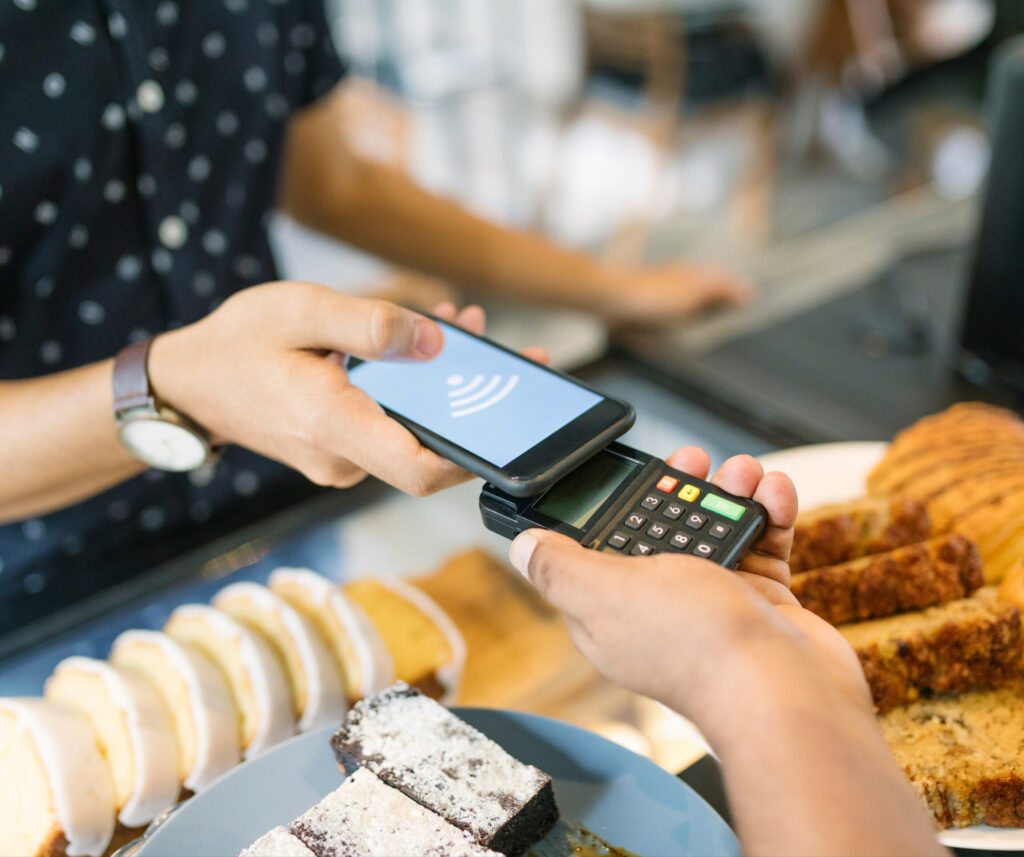
Contactless payments allow your customers to make a purchase without having to swipe their cards. The merchant device receives payment information from the reader. The POS system processes the payment using Near Field Communication (NFC) technology, which wirelessly sends information between their credit card and phone. More about this in the following section.


How Mobile Payments Work


Mobile payments are made possible by two types of technology, MST and NFC. The difference between them depends on how your customers make the actual purchase. 


NFC technology allows two devices to communicate with each other when within close proximity. NCFs use a virtual token that stands in for the card numbers, which are transmitted to the bank or credit account.


MST, or Magnetic Secure Transmission, uses magnetic pulses to stimulate the card-swiping motion, allowing customers to use their mobile phones to make payments at traditional POS terminals that do not have NFC capability. 


Encryption is also used in both forms of technology for mobile payments to protect users’ information. When customers pay using their phones, their data is encrypted so that it can not be intercepted and misused. 


Benefits of Mobile Payments


Your customers are already using their phones for just about everything else, so it only makes sense that they would want to use them to pay for your products and services as well. Mobile payments are fast, easy, and convenient—three things that customers always look for. But there are additional advantages to you and your business. 


• Payments via your smartphone are secure – When you accept payments from this technology, you use some of the most secure payment methods available. These payments are processed through layers of encryption networks, so it is difficult for hackers to access customer information.

• Mobile payments can save your company money – Did you know that businesses that accept mobile payments can save money on transaction fees? This is because mobile payment processors typically charge lower fees than traditional credit card processors.

• You can use mobile payments to get paid faster. If you’re used to waiting for customers to mail payments or send via ACH, you know it can take weeks to receive the money. But with mobile payments, you can get paid almost instantly. Plus, the convenience of sending directly to your client’s phone will almost guarantee a fast return.

• Manage your cash flow – Best of all, mobile payment systems can have additional functions for businesses to track their sales and overall spending more effectively. Not only do you get a visual record of each transaction, but some platforms enable you to utilize a cash flow management system to make better-informed decisions about your business and operating decisions. Successful Payments with Mobile Apps.


Mobile apps are becoming increasingly popular as a way to manage finances. In fact, according to a recent study, roughly 79% of Americans now use mobile apps. While there are many ways for your customers to pay you using a mobile app, the following tips will help ensure that your first transactions are successful.


1. Choose a reputable app: Make sure that you’re using an app from a trusted source. Study reviews and ratings before downloading a new application, and only download apps from official app stores such as the App Store or Google Play.

2. Check security features: Before making any payments, check that the app has robust security features. Look for features like encryption and fraud protection.

3. Make sure the app has good customer service: If you ever doubt whether a payment went through, make sure you have a consistent line with the app’s customer team for assistance. It is even better if they have multiple forms of contact, such as email, chat, and phone support.


Conclusion


When it comes to technology, there are a lot of options out there, and businesses today are under more pressure than ever from their customers to adopt the latest and greatest technologies. 


Fortunately, mobile payments are safe, fast, and easy, with many benefits that will make life easier. However, it is crucial to keep up-to-date and research your options before making any decisions. Confirm which technology works best in conjunction with what matters most within your organization.


How FINSYNC Can Help


FINSYNC allows you to run your business on One Platform. You can send and receive payments, process payroll, automate accounting, and manage cash flow. To learn more about how we can help your business start, scale, and succeed, contact us today.

The Benefits of a Strong Payment System for Your Business

Small businesses are the backbone of the American economy, creating two out of three jobs and accounting for half of all private-sector payrolls. Therefore, a strong payment system is vital for smooth and efficient transactions between businesses and their customers, suppliers, and partners.


This article will explore the benefits of a robust payment platform for your business, different types of systems, and how to choose one that will maximize your business’s success.  


What Is a Payment System?


A payment system is a system of transferring money from one party to another through various means, including cash, checks, ACH transfers, wire transfers, credit cards, or other means. The most common payment systems allow for the exchange of fiat currency, such as the U.S. dollar or the Euro. However, several digital payment systems allow for cryptocurrency transfer, such as Bitcoin or Ethereum. 


Payment systems play an essential role in the economy, as they allow for the smooth flow of commerce, including the purchase of goods and services.


Benefits of Payment Systems


Payment systems are the various methods businesses use to send and receive currency. There are various processes, but all of them share the same goal: to facilitate transactions between companies and their clients, vendors, and partners.


There are many benefits to using a payment system. Perhaps the most obvious benefit is that payment systems make it easy for businesses to transact with one another and offer a fast and convenient way to pay and get paid. 


Payments systems also provide a way for businesses to track their spending, which can help them keep tabs on their cash flow management. Tracking and scrutinizing purchases serves as a roadmap to reduce costs and influence future strategies.


Most importantly, implementing a payment system can help your business run more efficiently and effectively. You can save time and money by automating payments so you will have more time to focus on running your business.


Types of Payment Systems


Small businesses that want to integrate a payment system for an automated payment platform should be aware of the different types of payment systems available. 


Here are some of the most common types of payment systems:


• Cash: This is the simplest and most common type of payment. It involves exchanging physical currency for goods or services.

• Credit and debit cards: Traditionally, these payments were tied to a physical, numbered card that could either withdraw funds from a checking account (debit) or access a line of credit. This type of payment is popular because it is fast and convenient for purchasers and sellers to receive funds directly into their bank accounts.

• Electronic: This type uses technology to transfer money between parties who are not in physical proximity and includes credit cards, debit cards, virtual cards, and ACH. ACH utilizes a network of financial institutions to move money rather than through card networks. 

• Mobile: This type of payment allows customers to pay using their mobile devices but is generally tied to one of the “payment rails” mentioned above. This method continues to grow in popularity because of its speed and convenience.


Choosing the Right System


It can be tricky to decide which payment system is right for your business. You need to consider your customers’ needs, the products or services you offer, and your overall budget. 


Here are some tips to help you choose a suitable payment method for your small business:


1. Decide which type of payment system you need. Various systems are available, including online payments, credit card processing, and POS systems.

2. Consider the needs of your customers. Do they need lots of features or a simple interface? What about currency exchanges?

3. Decide how much to spend on payment processing fees. Some systems have lower costs than others.

4. Make sure the payment system is compatible with your accounting software. This will make it easier to track payments and reconcile transactions.


Getting Started


There are a few things you need to do to get started with your payment system. First, you need to set up your account with a payment processor. You can do this by either signing up for an account with a company that provides payment processing services or by setting up an account with a company that specializes in online payments. 


Once you have an account set up, you will need to add your bank account information so that you can start receiving and sending payments. You will also need to add your credit card information so that you can make and record these transactions as well. 


Finally, you will need to set up a merchant account so that you can accept credit card and ACH payments from customers. Once you have all of this set up, you will be ready to start using your payment system to make and receive payments.


Common Mistakes


One of the most common mistakes businesses make when it comes to payments is not considering the needs of their customers. You need to find a system that is both reliable and easy for your customers to use.


Another common mistake is choosing the wrong payment method. There are a variety of platforms available, so do your research and find one that fits the needs of your business.


Finally, businesses often spend too much on payment processing fees. Make sure you shop around and compare rates before settling on a payment system.


Payments play an integral role in the success of any small business. When customers make a purchase, they expect the transaction to be processed quickly and safely, and if it isn’t, they may shop elsewhere. Whether you are sending or receiving money, the process must be efficient so your company can thrive in today’s competitive environment.


How FINSYNC Can Help


FINSYNC allows you to run your business on One Platform. You can send and receive payments, process payroll, automate accounting, and manage cash flow. To learn more about how we can help your business start, scale, and succeed, contact us today.


What Is an Invoice? Best Practice Guide for Your Small Business

Sending and receiving invoices play a critical role in the success of your business. Therefore, documenting these transactions should be at the forefront of your company’s organizational goals. 

This article covers what an invoice is and the elements within an invoice. We will also cover assigning invoice numbers and creating an overall process for sending and receiving these transactions.

What Is an Invoice?

An invoice or bill is a legal document given to a buyer by a seller that states the total amount due for goods or services rendered. The customer will likely refer to it as a bill and it is how businesses get paid. An invoice lists the products or services provided by the seller, including payment terms such as Net30 (payment due in 30 days), for example. 

Invoices also include other relevant information such as:

    • Business contact information
    • Vendor contact information
    • Invoice number
    • The order or service date 
    • Description of service or product purchased
    • How many units and/or hours worked
    • Total amount due including taxes and shipping & handling charges

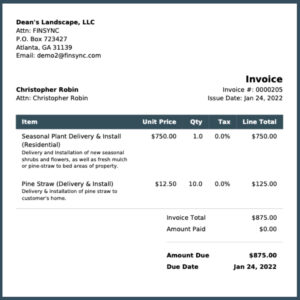
Invoices may be transmitted electronically, in the mail, or within the product package along with the packing slip. However, today many organizations use accounting software to speed up collections and increase operational efficiency. See sample invoice below:

FINSYNC sample invoice

Assigning Invoice Numbers

Since businesses want to get paid as fast as possible, setting up a process around sending invoices to customers is necessary. Assigning invoice numbers is a great place to start. 

Every bill issued has to have an assigned, unique control number for accounting purposes and preferably linked to the product or service requested. 

There are several different approaches to assigning invoice numbers. Here are a few standard methods:

    • Sequential – is the simplest and most common method of assigning invoice numbers. Start with #1 and increment up by one for each subsequent invoice.
    • Customer ID – this method is similar to sequential, but it begins with a customer code before this sequential number. If you assign a specific customer the code of 555, then their first invoice is recorded as 555-001.
    • Chronological – here, the first series of numbers is the date, the second series of numbers is the Customer ID, and the third series of numbers is the sequential number.
    • Project-Based – this method is similar to a Customer ID, where business owners assign unique numbers identifying a particular project. This numbering method works best with businesses that work with a wide variety of projects.

Leverage Best Practices

Using software can help you automate and track your invoicing. However, it is advisable to establish a process for every invoice that leaves your business. Here are a few guidelines to get you started in creating a successful invoicing method for your organization. 

    • Invoice at the right time – Sending a bill when products are ordered, or services have concluded is critical. The more you delay, the longer it will take to get paid.
    • Define payment terms – It is common to give your customers 30 days to respond with payment. However, feel free to adjust according to what works best for your company. Just make sure to notate it on the bill.
    • Online payments – Thanks to efficient software, it has been shown that allowing customers to pay online increases the speed of payment drastically.
    • Offer Lockbox options – This feature benefits businesses that receive a considerable amount of checks. FINSYNC’s Lockbox provides enormous time savings as checks are automatically deposited and applied to the correct invoice. 
    • Incentivize early payments – People love incentives! Reward your customers when they pay early by offering a discount on their following product, or a shout-out on social media can go a long way to collecting payments early. 
    • Send clear reminders – We all get busy and sometimes forget about important obligations. Make sure to send reminders around Day 20 if your terms are Net30. 

Fortunately, many business transactions are straightforward; however, some invoices involve many moving parts. These details should be outlined so both parties know when payments are due and what the penalties for late payments are. 

Summary 

Invoices are an essential tool for your business to handle transactions with your customers. By crafting detailed invoices and following a procedure, organizations will be ready for an audit and get paid on time.

In providing documentation, you can accurately track your orders and payment cycles and when created accurately, invoices provide security with your transactions. The method you choose to establish in your organization will ensure your invoices are compliant and informative for you and your customers.


Learn What a PO Number Is & How to Create a Purchase Order

One of the vital components of acquiring goods and services within an organization is establishing a PO Number system. A PO Number or purchase order number is an alphanumeric code assigned to a specific transaction. Using PO numbers creates a paper trail between buyer and seller and makes it much easier to track the status of a particular transaction when both parties may have many open transactions both together and with other parties.


Documenting all business transactions is vital to the success of an organization. When you order something your business needs, you want to be sure you receive it at the agreed-upon price. Thus, having a unique identifier helps avoid confusion when an invoice arrives. 


The purchase order number saves time and resources when tracking down invoices and shipments. 


In this article, you will learn more about the aspects and processes of a PO Number. In the end, you will learn how to create a purchase order number system for your organization. 


Purpose and Function of PO Numbers


Buyers send a purchase order to vendors or suppliers at the beginning of a transaction. The purchases are assigned a PO Number, which is usually sequential or incremented up from the last purchase order issued. This is referenced throughout the entire transaction and even included on the packing slip


The purchase order number is used to reference the purchase order, which contains the list of goods or services desired by the buyer. 


Other important information, including desired delivery date and payment terms, is often included. Hence, it gives anyone in both companies a solid reference point to track transactions. 


By referencing purchase orders, a business can learn a lot about the volume and type of products ordered over time. You can analyze a company’s cash flow and interpret which departments buy or sell the most, for example.


PO Number Process


The buyer always initiates the purchase order and assigns the PO number.


• First, an employee gains approval for a purchasing request. This approval kicks off a PO Number assignment. 

• Next, the order is placed with another company or vendor via submission of the approved purchase order. The vendor records the PO number and products or services requested. Eventually, it becomes prepped for packing and shipping. 

• The goods or services are delivered and/or accomplished along with the invoice, which should match the purchase order. The invoice typically contains the purchase order for easy matching. 

• Finally, with an easy-to-find PO number on a vendor’s invoice, it’s easy to expedite the payment.


How to Create a PO Number


Any business can create a purchase order template and assign a numbering system. 


However, licensing an accounting and financial system will save a lot of time and effort. Purchase order number generation is within FINSYNC’s cloud-based accounting software. The system auto-generates and applies a purchase order number for all purchase orders created. Then, route them for sign-off. All purchase orders are stored sequentially for easy reference.


If your business does not use professional accounting software, you can create your own PO Number template. These codes must be in alphanumeric format with or without dashes. Most companies will use letter and number combinations to represent locations, vendor names, and dates.


Ensure enough product or service details so the seller quickly understands how to fulfill the request—the less back and forth, the better. 


Conclusion


It doesn’t matter if you are the business or the vendor; having a purchase order number makes things easier for everyone. 


On the customer side, a buyer may have an issue with an order placed five months ago. By using the PO number, tracking the service order and invoice will be much simpler. 


Integrating a PO Numbering system prevents a business from having duplicate orders, incorrect filings, and other common accounting errors. 


Learning all the forms and tools you need to prosper can be overwhelming when you first start a business. The best outcome is to incorporate some form of purchase order tracking system. Get an excellent handle on your small business finances straight out of the gate.


How FINSYNC Can Help


FINSYNC allows you to run your business on One Platform. You can send and receive payments, process payroll, automate accounting, and manage cash flow. To learn more about how we can help your business start, scale, and succeed, contact us today.

5 Questions to Ask When Choosing a Payments Platform

Small business payment processing can get complicated, starting with choosing a provider. What exactly should you look for? Should you focus on security? Affordable prices? And what about integration with your existing platforms? 


While there will always be needs specific to your small business, there are some general boxes a good payment platform needs to check to optimize your payments. In this article, we’ll review five essential questions to ask a potential payment processing provider to ensure you’re making the right decision for your business.


1. How Is Their Security?


People are still wary of sharing their credit card details online, especially when it comes to a company credit card. Therefore, security is perhaps the most important area where your payment platform needs to shine. There are a few best practices you can look for when researching payment platforms. 


The first one is a double-blind system, where the payment platform withholds financial information from both parties. You will never see your customers’ bank account or credit card data, and they will never see yours; the payment platform alone is responsible for keeping the information safe. 


The second practice is compliance with the official industry standard: the Payment Card Industry Data Security Standard (PCI DSS). “PCI Compliance,” as it is generally referred to, is an important standard for payment platforms, and compliant companies will typically display it visibly on their website. If not, all you need to do is ask.


2. Do They Accept All Common Payment Methods?


Confirm if the payment platform offers the payment methods your customers are most likely to use. Electronic payments such as credit cards and ACH payments are the two most obvious but don’t forget about checks. According to Goldman Sachs, as many as 80% of all small business invoices are still paid by check.


Accepting checks can be a demanding process for a small business. However, it can be made easier if your payment platform offers a lockbox service, where checks are processed for you and converted into ACH payments.


3. Does the Payment Platform Offer Robust Customer Support?


If the worst happens — a disruption in your payments — how quickly will your payment platform respond? After all, your payment platform is your livelihood. Any disruption in your payments might have a negative effect on your cash flow. If that happens, you need to be sure the payment platform you use will respond quickly. 


To be sure, you can ask:

•  Where their customer service is located

•  If they offer 24/7 support

•  What other resources are available, such as FAQs and video tutorials


4. Can the Payment Platform Integrate with Other Software?


Your payment platform will have to be integrated with your other software to make sure your day-to-day operations run smoothly. Depending on what type of small business you run, you may need to integrate with:


◦ e-commerce software

◦ accounting software

◦ analytics provider(s)


For example, an integration with your accounting system can make bookkeeping easier, especially when it comes to accounts payable and accounts receivable. Along the same lines, integration with your analytics services can provide you with valuable customer insights.


5. What Is the Price Structure?


Some payment platforms charge a flat fee, while others have transaction-based pricing. No pricing structure is necessarily better than another. What is best for your business depends on how many transactions you have per month, how much security you need, and what additional features you want.


However, you can expect to pay all or some of the following fees:


• Transactional fee – a fee you pay for each payment to the payment provider. Typically, this fee is a mix of a percentage of the amount, a set small fee for card payments, and a flat fee for ACH and check.

• Interchange fee – this is the fee an issuing bank charges for the use of their cards. This fee is typically captured in your transaction fees.

• Monthly or annual fee – a fee you pay for using the payment platform on top of the transactional fees.

• Batch fee – payment platforms will batch payments together and deposit them once a week to your account. Sometimes, there is a separate fee for that service.

• Chargeback fee – if a payment is rejected, you will most likely incur a fee.

• User seats – some platforms let you have as many users as you need. Others charge per additional user, typically monthly.


Beware of any hidden fees, which usually show up as penalties. Study the fine print and see if there are any restrictions on the number of transactions or the maximum sum per month, for example.


Lastly, it’s important to make sure it’s free for your customers to pay you. You should be able to absorb any fees for your client when you request a payment.


Choose a Platform That Meets the Needs of Both You and Your Clients


Choosing a payment platform can be tough, but ultimately, you need to focus on how it can best serve you and your clients. Your clients care about using their preferred payment methods. They also want their payment information to be safe from hackers.


Of course, security is also important for your payment information, as it is equally vulnerable to hacks and accidental leaks. Beyond security, small businesses should look for excellent customer service, reasonable prices, and easy integration with your existing software.


How FINSYNC Can Help


FINSYNC allows you to run your business on One Platform. You can send and receive payments, process payroll, automate accounting, and manage cash flow. To learn more about how we can help your business start, scale, and succeed, contact us today.

Apply For Business
Checking Account

Before you get started

1

We are not able to service these businesses at the moment:

  • Crypto Currency and Money Services
  • Privately Owned ATMs
  • Marijuana-Related
  • Gambling
  • Money Services Business
  • Business headquartered outside of the U.S.
2

At this time we are offering online business checking accounts through bank partners in these states:

  • Arizona
  • California
  • Idaho
  • Nevada
  • New Mexico
  • Oregon
  • Texas
  • Utah
  • Washington

Is your business in one of these states?